Tap the lineup, count the play
Players appear in jersey-number order with large numbers and clear in or out states. One button adds a play to everyone selected.
Play counter
Open the game on your phone, tap the players who are in, and count the play. See each player's total and spot anyone still below your team's minimum.
Included in the free plan. No credit card required.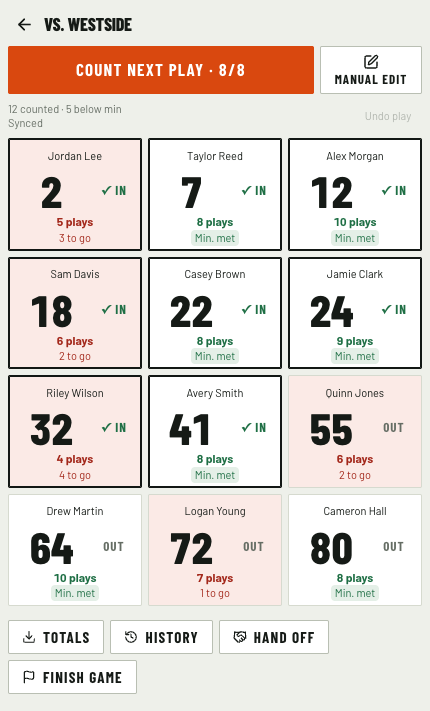
Players appear in jersey-number order with large numbers and clear in or out states. One button adds a play to everyone selected.
Set your team's minimum in settings. Players below it have a light red background; their progress turns green when they reach the minimum.
Switch to manual edit for quick plus or minus corrections to a single player. Live counting and lineup changes pause until you switch back.
Delegate play-count rights without granting full coaching access. One device counts at a time, with a handoff when someone else takes over.
Choose players per side and the minimum, grant counting rights, and check who's available.
Tap players in or out, then count the next play. The counter blocks counting if too many players are selected.
Undo the last action or make a manual correction. Finish the counter to keep final totals for the game.
Yes. Set your team's players per side for your format. The counter allows counting with that number or fewer selected players and blocks it when the lineup is over the limit.
Start and open the counter while online. Once open, lineup changes and counts can save on the phone and sync when the connection returns. Starting, finishing, or handing off the counter needs a connection. The screen shows whether changes are saved on the phone or synced.
An administrator can give a team member play-count rights separately from their role. That grants access to the counter and the roster information needed for counting.
Play maker, film room, play counter, and scheduling are included. Start with 20 saved playbook plays and 100 GB of video storage, with AI cuts and suggested play information.
Original uploads and generated media share the storage allowance. AI results need coach review and processing has usage safeguards. No credit card required.